European email, no compromises.
Dazr Mail has the full toolkit of a professional mailbox, and goes further: strangers knock before they reach your Inbox, updates and receipts sort themselves, and every answer you are waiting for is tracked. Built in Italy, under European law.
Free to start with an @dazrmail.eu address. No card needed.
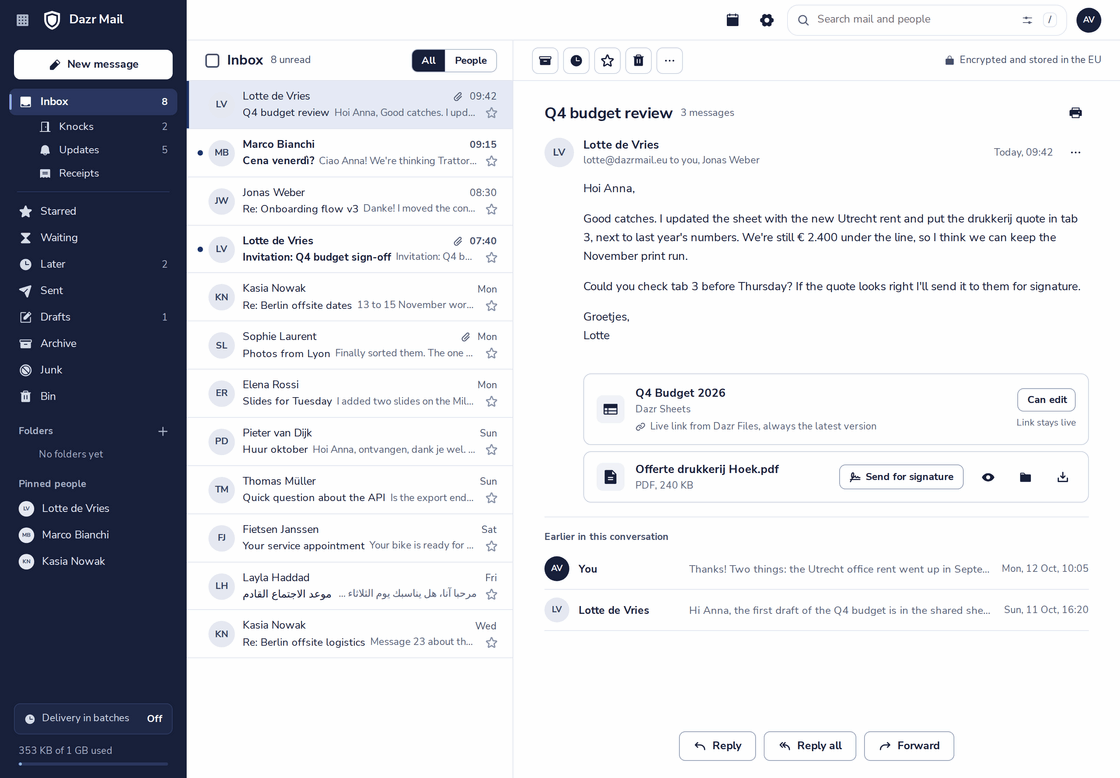
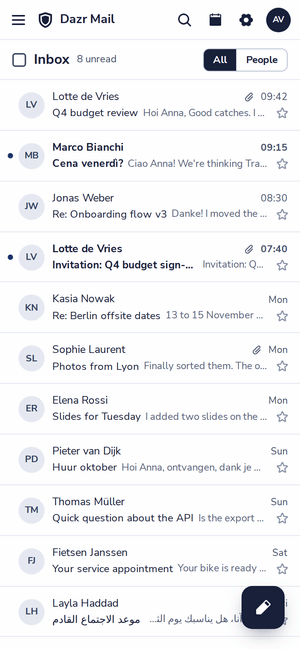
A conversation with the newest message on top and the earlier ones folded underneath. On the right, the inbox on a phone.
The complete toolkit.
Everything you rely on in a professional mailbox, from the first day.
Nested folders that your phone and desktop apps see too, Archive on one key, and search with filters for sender, dates, attachments and categories.
Snooze a conversation until tonight, next week or any date, or only if nobody replies by then.
Write now and send at the moment you choose. Pressed Send too soon? Take the message back in the seconds after.
Rules, blocked senders and automatic replies run on the mail server, so they work even when Dazr Mail is closed.
Your own signatures, or one for the whole company with the logo, set by an admin. Shared templates for the replies you send every week.
The shortcuts you know from Outlook on the web, plus single keys for speed. Press ? to see them all.
An Inbox that sorts itself.
The mail that needs you comes first. Everything else has its own place.
Newsletters, notifications and order confirmations go to Updates and Receipts, right under the Inbox. Your Inbox is the people who write to you.
One switch above the list shows only mail from people you know.
Star what matters, and give conversations your own colour categories, as in Outlook. Rules can add them as mail arrives.
Turn it on and new mail arrives at the times you choose, for example 08:00 and 13:00. People you pin come through right away.
Strangers knock first.
Mail from someone who never wrote to you before waits at the door until you let them in.
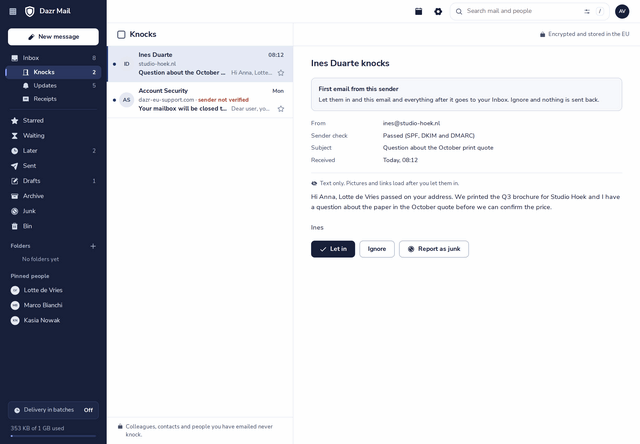
First-time senders land in Knocks, under the Inbox. Let them in and everything they send after that goes straight to your Inbox.
Next to every knock: whether the sender passed SPF, DKIM and DMARC, or a clear “Sender not verified” for mail that pretends to be someone else.
A knocking message shows as plain text. Pictures and links load after you let the sender in.
Your colleagues, your contacts and everyone you have emailed come straight in.
Ignored senders get no answer, and a fake bank or support desk shows up as not verified. How Knock works
Answers you’re waiting for, kept.
Ask a question by email and Dazr Mail remembers it for you.
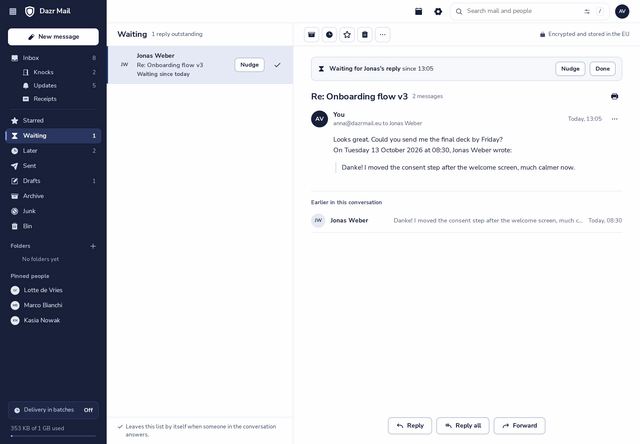
Write “Could you send it by Friday?” and the Wait for a reply switch next to Send turns on by itself, in every language Dazr speaks. One click turns it off.
Waiting shows every message that still needs an answer, and since when.
The moment someone in the conversation replies, the message leaves the list by itself.
Still nothing after three days? Nudge sends a short, friendly reminder in the same conversation.
Everything with one person, on one page.
Click a name and see what you have going on together.
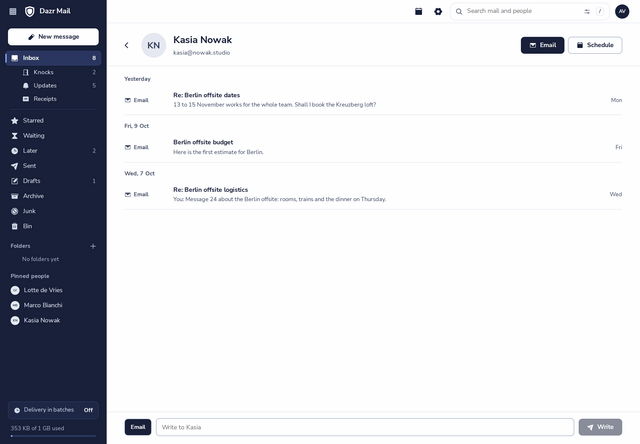
Every email and every meeting with that person, newest first, by day.
For colleagues, the page shows whether they are free, from their availability in Dazr Calendar.
Send an email or a chat message from the same page, or plan a meeting with them in Dazr Calendar.
Attachments that stay current.
Share a file from Dazr Files instead of a copy that goes out of date.
A file shared from Dazr Files is a live link. Change the file after sending, and the message says “Updated after sending”.
Sent to the wrong person, or the deal is off? Take back the file, and the link stops working.
Nobody is told whether a file you send was opened. Dazr doesn’t count it and doesn’t record it.
Fits the way you work.
Your own domain, your phone, and the invitations your clients send.
Use an address like anna@yourcompany.eu next to your @dazrmail address, with the same inbox. Dazr Mail shows the three records to add and checks them for you.
Use Dazr Mail in any browser, or add it to the mail app you already have with IMAP and SMTP and an app password.
Accept, decline or propose a time, and the meeting is in Dazr Calendar. The organiser gets a proper reply.
Bring your old mail as .mbox or .eml files, your contacts as a CSV or vCard and your calendar as .ics. How to move
European, through and through.
Email is private. Dazr Mail treats it that way.
Your mailbox is stored encrypted on European infrastructure, by an Italian company, under European law.
There are no ads in Dazr Mail, and your mail is never used for advertising.
One sign-in for Mail, Calendar, Contacts, Teams and Files. Your mailbox shares the storage of your plan.
Sending for a business? The data processing agreement applies automatically. More in the trust centre.
Questions, answered.
Is Dazr Mail free?
Yes. With a free Dazr account you get one address on @dazrmail.eu, @dazrmail.com, @coldregards.eu or @coldregards.com, and your mail shares the storage of the Free plan. Personal adds your own domain and 100 GB; Pro and Enterprise add your company domain. See pricing
How does Knock decide who knocks?
Anyone who never wrote to you before knocks, unless they are a colleague, in your contacts, or someone you emailed. Let them in once and they never knock again. You can turn Knock off in Settings, under Blocked senders.
Can I use my own domain?
Yes, on Personal (a domain of your own) and on Pro and Enterprise (your company domain). You add three records at the company where you bought the domain, and Dazr Mail checks them for you.
Can I use Dazr Mail on my phone?
Yes. Dazr Mail works in the browser of your phone, and you can add your account to the mail app on your phone or computer with IMAP and SMTP and an app password.
Can I bring my old mail?
Yes. Export it from your old provider as .mbox or .eml files and import them into a folder. Contacts and calendars come along too. How to move
Does Dazr Mail read my mail?
Dazr Mail shows no ads and never uses your mail for advertising. Sorting, Knock and Waiting for reply run as rules on your own mailbox.
Get your address today.
Choose your address in a minute, free with your Dazr account. Add your own domain when you are ready.
How Knock worksMoving to Dazr MailPricingDazr Mail and GmailDazr TeamsQuestions? Contact us